To enhance the payment capability of KPay Business Account, the Payroll Management feature enables you to pay and manage your staff's salary more conveniently. You can manage your payroll setting on KPay App and the KPay Dashboard.


To enhance the payment capability of KPay Business Account, the Payroll Management feature enables you to pay and manage your staff's salary more conveniently. You can manage your payroll setting on KPay App and the KPay Dashboard.
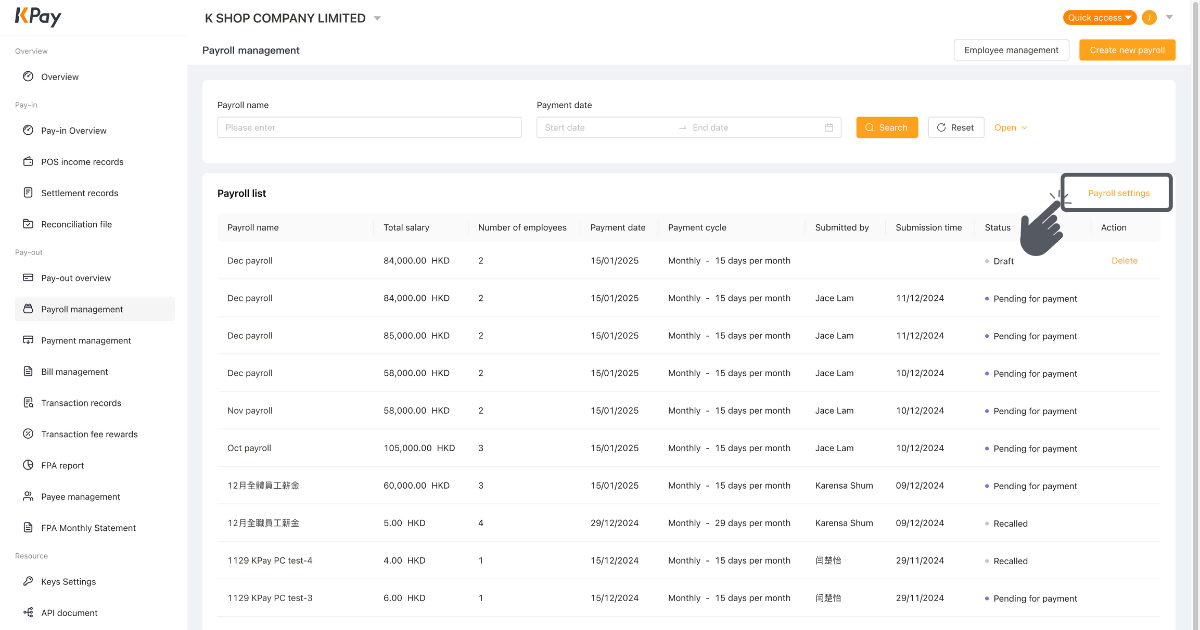
Step 1: Click “Payroll settings” on the “Payroll management”.

Step 2: For monthly payroll, it can be generated at most 10 days before. For weekly payroll, at most 3 days before.

Step 1: Click “Payroll management” on the “Pay-Out” page.
Step 2: Click “Payroll settings”.
Step 3: Click to change the number of days.

Step 4: Choose your desired days and click ‘Confirm”.
Step 5: Review and click “Save”.

If you encounter any issues, feel free to contact us at 3706 7828 during business hours (Monday to Sunday, 10AM - 10PM).
%20(4).png)



.png)




.jpg)