Tap to Pay: What is it and how to turn your phone into a payment terminal
22 July 2026
4 min read
KPay Editorial Team
Making the complex sides of financial management, business operations and digital transformation simple. We share practical tips and local stories to help you run your business smarter and grow faster.
Key takeaways
Eliminating setup friction and implementation costs: Turning your mobile phone into a contactless paymentterminal requires zero technical expertise, with minimal setup required.
Never miss a sale: With your smartphone doubling as a payment terminal, you're equipped to accept contactless payments anywhere — from pop-ups to peak-hour rushes.
Activating Tap to Pay: Apply for a KPay merchant account, and activate the Tap to Pay feature within the KPay App or KPay Dashboard to start collecting contactless payments in Cashier Mode.
Upgrading your payment systems or expanding your accepted payment methods comes with a lot of considerations for small business owners and solo entrepreneurs. When it comes to introducing new tools into an existing system that works, you may foresee challenges like high implementation costs, business downtime, or cases where employees struggle to adapt to new systems and slow down operations.
For small businesses and entrepreneurs, ensuring your payment processes are running at peak efficiency is a necessity. This is where Tap to Pay comes in – a contactless payment solution that empowers businesses to deliver the fast and secure payment experiences that your customers expect, anywhere and anytime.
Common pain points of SME payment processing
Costs of implementation
As SME business owners, the pressure is on you to maintain healthy profit margins while trying to keep prices affordable for your customers. Traditional contactless payment methods often incur maintenance costs and miscellaneous costs, such as thermal paper for receipt printing.
Workflow disruptions
For fast-growing SMEs or business owners who are always on the go, it's important to ensure a seamless process when it comes to accepting contactless paymentoptions for a smooth customer experience. Introducing the wrong payment processing tool into your workflow may confuse staff members if they are not properly trained to use the payment tool, or trigger system downtime during crucial sales windows.
Decentralised payment histories across different platforms
At the cost of accommodating different customers' payment preferences, your payment transactions are scattered across various payment platforms every business day. Manually piecing everything together at the end of the day takes time while incurring the risk of manual accounting errors and transactions unaccounted for.
How KPay can help lighten your load with Tap to Pay
Tap to Pay enables merchants to start accepting NFC contactless payments right away—minimising downtime, easing employee adoption, and ensuring a seamless workflow transition.
Reduce tech frustration among staff members
Tap to Pay features a clean, user-friendly interface that lets you accept contactless payments in seconds. You can also train your staff without the need for lengthy onboarding sessions, ensuring that there are no disruptions to your daily operations. Featuring a clean, user-friendly interface, staff members can easily adopt Tap to Pay and accept NFC contactless payment methods immediately.
Accept payments in just a few taps on the KPay app.
No downtime or productivity challenge
Upon having your KPay Merchant account activated, you may enable the Tap to Pay feature on your mobile phone easily. Once you activate Tap to Pay, your smartphone serves as a payment terminal that can accept contactlesspayments.
One less thing to manage
As a business owner or staff manager, you may face overwhelmingly busy periods of operational pressure, whether you're attending to customer enquiries, managing social media, or keeping up with day-to-day transactions. Tap to Pay consolidates contactless payment transactions into your phone, so you can focus on driving sales.
Improved checkout efficiency
Whether it's the peak post-work crowd or the Sunday morning rush, the need for improved checkout efficiency is amplified by frustrated customers waiting for payment terminals to free up.
Tap to Pay equips staff with a roaming contactless payment tool, enabling customers to pay on the spot and keep checkout lines moving during peak hours.
Activate Tap to Pay on your mobile phone
Whether you’re organising a pop-up by yourself, running a small cafe, or managing a multi-outlet restaurant chain, efficient contactless paymentsare important for closing sales and scaling your business. Here's how to activate the Tap to Pay feature on your smartphone:
How to activate Tap to Pay on your phone as an existing merchant
If you're already an existing KPay merchant, applying for Tap to Pay is a simple and quick process:
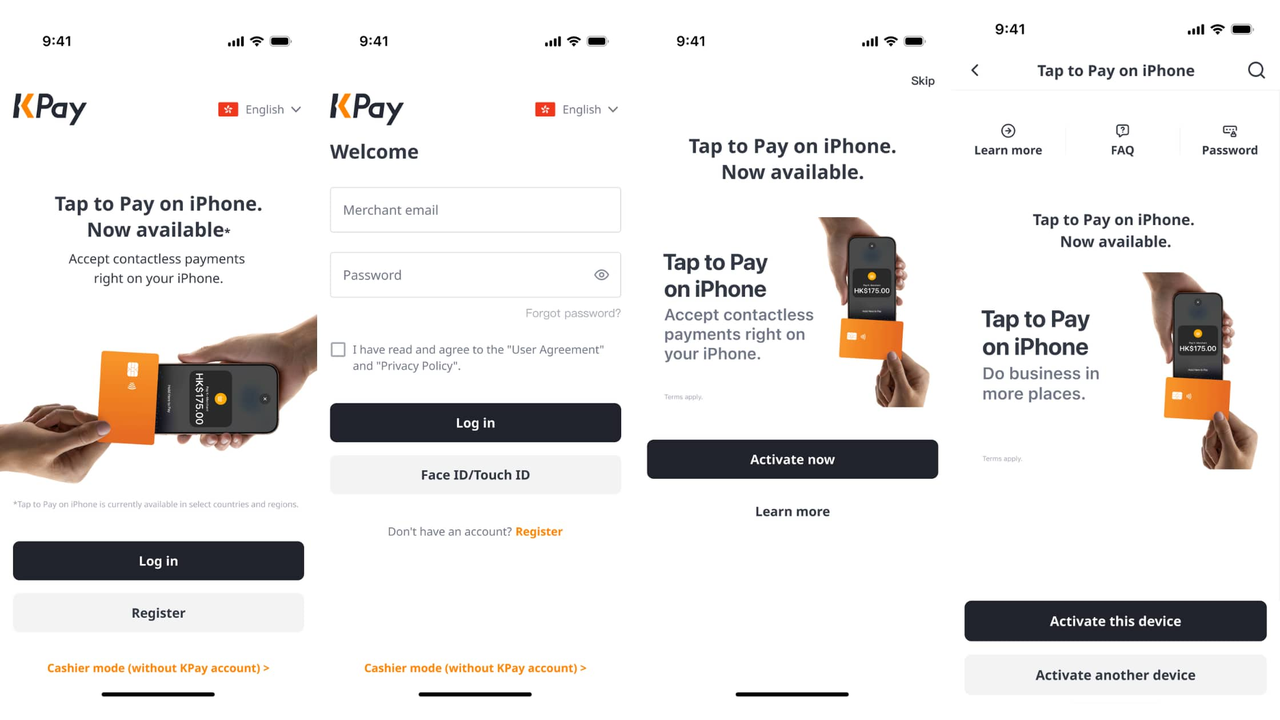
Open the KPay Merchant App
Log in to your KPay Merchant account
Tap on the Tap to Pay banner on the homepage, and select "Activate now"
Activate Tap to Pay for the device you're currently using, or activate it on your preferred device
You're ready to use Tap to Pay for your business!
How to Start Using Tap to Pay on Your Phone
When Tap to Pay is successfully activated on your phone, you and your team can start accepting contactless paymentsimmediately by activating cashier mode in 5 easy steps, even without access to KPay accounts.
Open the KPay Merchant App, and tap "Cashier mode (Without KPay account)" at the bottom of the screen.
Enter the device name and device code, or scan the QR code to link your device.
Tap "Activate now" after your manager has approved on the app.
Follow the instructions to set up your PIN.
Start accepting payments using the linked device.
Ready to Start Accepting Contactless Payments with Your Phone?
Transitioning to contactless payments doesn’t have to be a major headache or incur a hefty cost. By transforming your mobile device into a contactless payment terminal, there's no need for additional hardware, and you never miss a sales opportunity. Learn why Tap to Pay is essential for businesses in Hong Kong, or explore other payment processing options like WhatsApp Pay if you're also serving your customers online.









%20(4).png)



.png)