How to accept credit card payments as a small business without a payment terminal
28 September 2026
5 min read
KPay Editorial Team
Making the complex sides of financial management, business operations and digital transformation simple. We share practical tips and local stories to help you run your business smarter and grow faster.
Key takeaways:
Card payment expectations are rising in Hong Kong:More local customers carry credit cards. Offering credit card payments provides greater payment flexibility, and signals that your business is attuned to customer preferences.
Card payments create cleaner transaction records for audit: Automatic, timestamped transaction logs make it easier to separate business income from personal spending, even without a dedicated business account.
Tap to Pay offers customers peace of mind: Tap to Pay is compliant with local banking and financial regulations, ensuring every transaction is processed securely and according to payment industry standards.
Skip the invoice: Tap to Pay removes the need for you to invoice your client — there's now no delay between finishing the work and actually getting paid for it.
Your project has come to an end, and all that's left is to collect the balance payment agreed on with your client. For solopreneurs, freelance consultants and creators, this traditionally means sending an invoice and waiting — sometimes days, sometimes weeks — for it to work its way through a client's finance department before the funds actually land in your account. Private tutors face a similar lag, often waiting on the month's fees to come through after the fact, rather than getting paid as sessions happen.
However, when you turn your phone into a payment terminal, you don't have to default to that process by habit. While meeting your clients face-to-face, you can simply remind them of any upcoming payments, and offer them the option of paying on the spot with Tap to Pay.
With a clean, simple interface and the portability to accept payments anywhere, learn how you can leverage Tap to Pay to minimise payment delays and reduce the administrative load — freeing up your time to focus on the work that helps your business grow.
Why accepting credit card payments matter for small businesses
Understanding your customer or client, from how they prefer to receive your services, to how they interact with your business, is the first step to building lasting relationships that help your business grow.
As more Hong Kong consumers carry and use cards for everyday spending, chances are, your clients are as well. And with that comes the growing expectation that card payments will simply be accepted — even for small or one-off transactions like a single consulting call, a custom piece of creative work, or a tutoring session.
As small-scale service providers, it is important that you stay attuned to your customers' preferences and adjust how you run things to keep up with what they expect. When you accommodate their preferences, you're signalling that their needs and convenience are priority.
Common ways of accepting credit card payments
In Hong Kong, credit card acceptance is a widely adopted payment method across large chains and small businesses alike. SMEs in Hong Kong typically lean on payment infrastructure such as:
Payment terminals: This is a physical card machine that you tap, insert, or swipe a card on at checkout. It connects directly to a payment processor, sending the customer's card details their issuing bank to authorise and complete the transaction.
Payment links: Small business owners typically use payment links — either in the form of a QR code or unique URL to collect payments for their offerings. The business owner generates a unique payment link and sends it directly to the client via email, text, or chat, without needing any technical expertise or a website to set it up. The client clicks through to a secure, encrypted checkout page and pays whenever it's convenient for them.
Payment gateways: This technology that sits behind an online checkout, capturing and encrypting a customer's card details before sending them to a payment processor for authorisation. It's what allows a website or app to securely accept card payments without directly handling sensitive card data itself.
The alternative for solopreneurs: Accepting credit card payments from your phone
For individual service providers, the most reliable credit card payment acceptance method isn't always the most widely adopted one, it's the one that meets your needs effortlessly without the extra setup. Tap to Pay allows you to accept card payments directly through your phone. This means no additional hardware or a separate system to set up.
Benefits of collecting card payments with Tap to Pay
Faster payments, easy setup and payment security are integral to ensure that your payment infrastructure is reliable, and integrates seamlessly into your business operations. Find out how to collect credit card payments with Tap to Pay the moment a session, meeting, or project wraps up.
Secure and trusted payments: All mobile payments accepted with Tap to Pay are compliant with local banking and financial regulations, ensuring every transaction is processed securely and in line with Hong - Kong's payment industry standards.
Works for one-off sessions or project-based invoicing: Not every payment fits neatly into a monthly invoice cycle. A single tutoring session, a one-time consulting call, or a project that wraps up after one meeting can be settled with the cliently promptly, without the overhead of setting up formal invoicing for a single transaction.
No downtime or productivity challenge: Upon activating your KPay Merchant account, you may enable the Tap to Pay feature on your mobile phone immediately. Once you activate Tap to Pay, your smartphone serves as a payment terminal that can accept contactless payments.
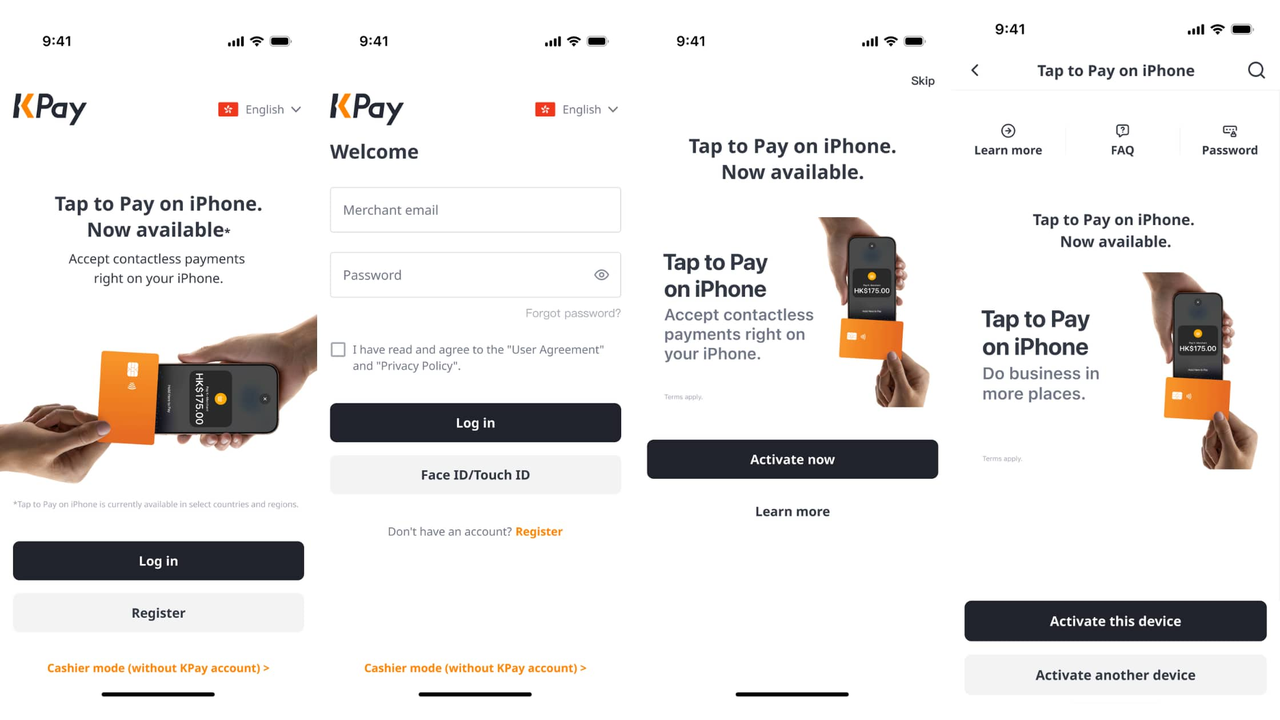
How to activate Tap to Pay on your mobile phone with the KPay app
If you're already an existing KPay merchant, activating Tap to Pay on your phone is a simple and quick process:
Open the KPay App.
Log in to your KPay Merchant account.
Tap on the Tap to Pay banner on the homepage, and select "Activate now".
Activate Tap to Pay for the device you're currently using, or activate it on your preferred device.
You're ready to use Tap to Pay for your business!
How to start using Tap to Pay on your phone
When Tap to Pay is successfully activated on your phone, you and your team can start accepting contactless paymentsimmediately by activating cashier mode in 5 easy steps, even without access to KPay accounts.
Open the KPay Merchant App, and tap "Cashier mode (Without KPay account)" at the bottom of the screen.
Enter the device name and device code, or scan the QR code to link your device.
Tap "Activate now" after the primary account holder has approved on the app.
Follow the instructions to set up your PIN.
Start accepting payments using the linked device.
Get paid faster with Tap to Pay
Whether you're collecting monthly fees for tutoring sessions or one-off payments after a project milestone, you can now skip the invoice, eliminate the wait for a bank transfer, and get paid instantly.